
Soon the new PADI Student Management Portal (SMP) will replace the Online Processing Center (OLPC) as new features are released.
Hopefully you’ve started using SMP instead of using the OLPC. If so, you’ve likely found that being able to manage a student’s entire educational journey and access student information in one spot is efficient and beneficial.
Most PADI Members have been invited to exclusively use SMP. If not, you will soon be asked to switch to SMP as new features are released that will fulfill all your specific needs. By mid-2026, all PADI Members will need to use SMP, because OLPC will be retired.
New SMP features continue to be launched, but here are a few recent additions:
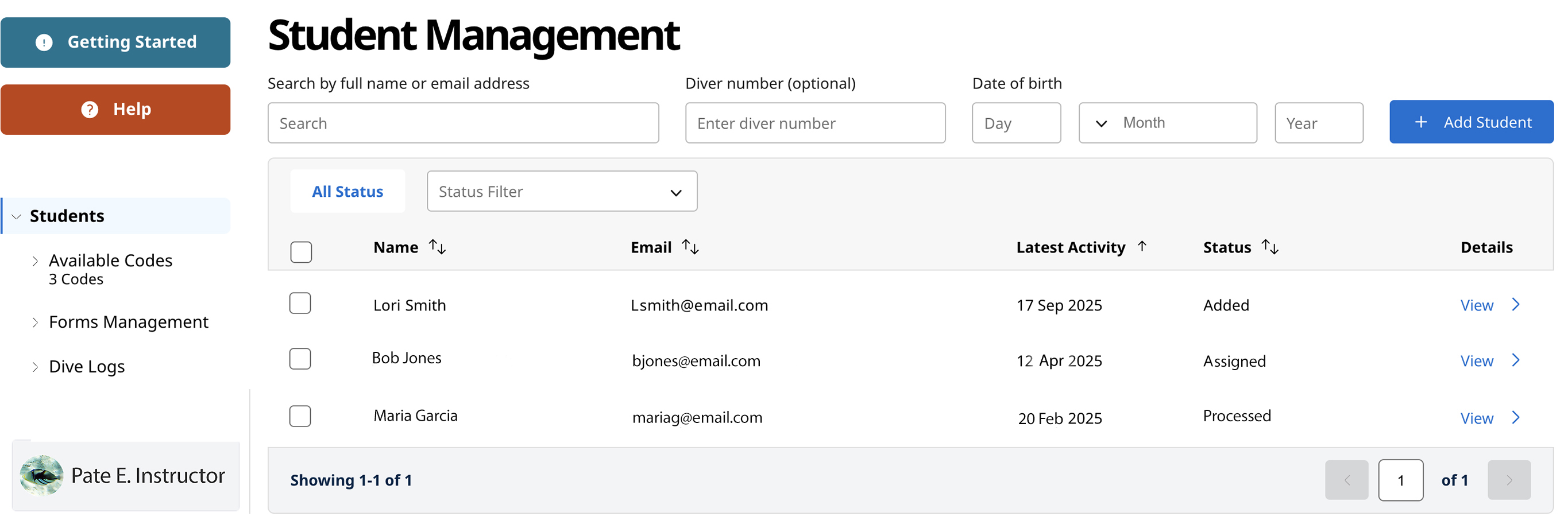
- Student Management – You can now edit a new student’s profile, add a home phone number and add students under age 17 (conforms with legal standards/requirements).
- Form Management Added to the Left Panel – This added reporting allows you to more easily track digital forms.
- Dive Log Added to the Left Panel – Allows quick access for log approvals.
- Certification Processing – PADI Centers can create instructor rosters, add multiple locations and set a favorite to speed up the certification process.
- eCard Selection – Added default selection to Standard eCard or 100% AWARE, and now supports donations for PADI AWARE eCards.
- Print-Friendly eRecords
Remember that you can refer to the Frequently Asked Questions (FAQ) document to get more information and watch a series of linked “How To” videos (in English) on the PADI Pros’ Site (Training/Teaching Resources/How To Videos) that provide expanded details about the SMP’s functions.