
Before conducting any PADI course in-water activities, you must make sure student divers complete required administrative forms, such as the PADI Release of Liability/Assumption of Risk/Non-agency Acknowledgment Form – General Training or the PADI Statement of Risk and Liability/Non-agency Acknowledgment Form – General Training, EU Version, the PADI Standard Safe Diving Practices Statement of Understanding and the Diver Medical form. Through the Student Management Portal, you can get this “paperwork” done efficiently online.
When a customer signs up for a PADI course, you can use the Student Management Portal to send a digital invitation to the student to set up an account to receive digital forms, usually at the same time you send an eLearning code. The student then receives the appropriate forms for the course.
Steps for Getting Forms to Students
- Log on to the PADI Pros’ Site and go to the Student Management Portal under Student Management.
- Find the student in your Student Roster or add a new student.
- In the student’s detailed view, select the Forms/Documents tab. Select Assign Forms.
- Choose the appropriate language from the dropdown list.
- Select the appropriate forms – multiple selections are allowed.
- At the bottom of the page, choose Select Action, then Send.
Your student diver will get an email with clear directions about filling out the forms.
Checking That Students Have Submitted Forms
To verify that your student completed the forms, log back on to the Pros’ Site/Student Management Portal and look at the student’s detailed view, then select the Forms/Documents tab.
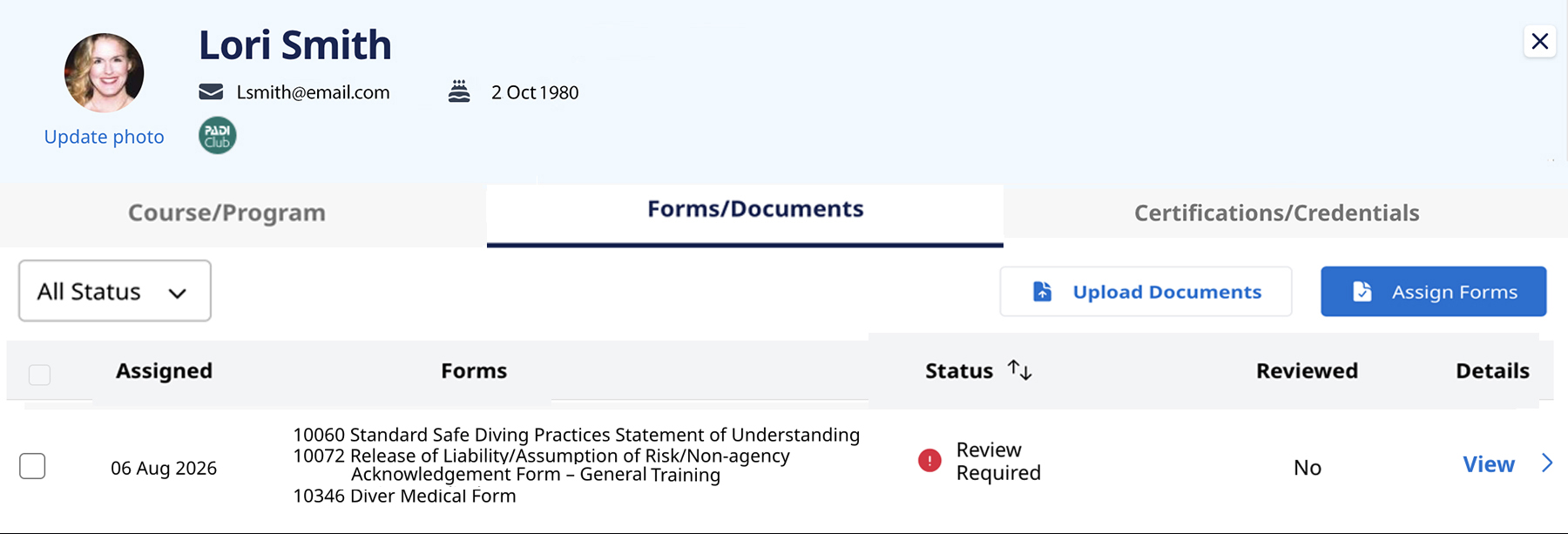
Look at the Status column. When it says “Review Required”, it means the student has completed the forms, and you need to check them for accuracy and completeness. You need to pay special attention to the Diver Medical form to confirm whether the student needs or does not need a physician’s approval to dive.
Both you and your students can access the completed forms at any time. You can also download the forms.
If a student does need medical clearance from a physician, when you receive the signed form from your student, you can upload it to the student’s profile. This helps you keep all student documents organized and in one place. Select the Upload Documents button on the Forms/Documents tab and follow the instructions.
If a dive center or resort has its own forms for certain activities, those can also be uploaded using the Upload Documents option.
Note that digital forms are available in many languages and are available not just for scuba courses, but also Freediver, Mermaid and TecRec programs.
PADI digital forms are convenient and time-saving. You continue to have a paper option using printed forms or those on the PADI Student Record File.